October 22, 2026
How to Add Stylish Text to Pinterest Pin Titles
Learn how to add stylish text to Pinterest Pin titles using fancy fonts, Unicode characters, and decorative symbols to create eye-catching titles.
Stylish text can make your Pinterest Pin titles look more creative and help them catch people's attention. You can use fancy fonts, bold letters, cursive text, and decorative symbols to give your titles a different look.
These styles work well for recipe ideas, fashion Pins, travel inspiration, and home decor content. However, choosing the right style is important. Your text should match your content and remain easy to read. The right text style can give your Pins a distinct appearance while keeping the focus on what you want to share.
How to Add Stylish Text to Pinterest Pin Titles
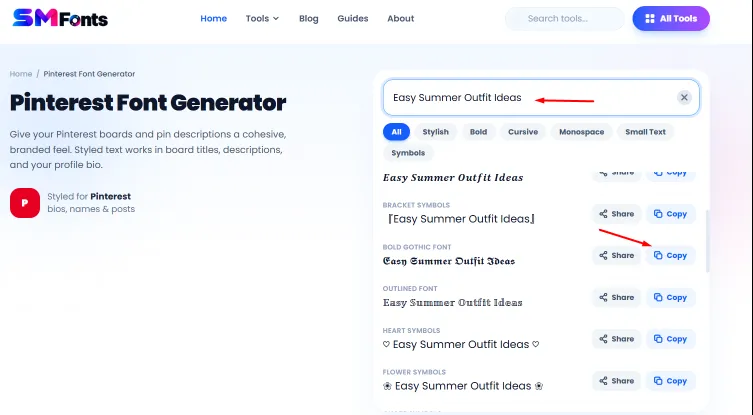
You can use Pinterest Font Generator to change plain text into different stylish fonts. The tool is easy to use and does not require you to install any software.
Follow these steps to create stylish text for your Pinterest Pin titles.
- Open the Pinterest Font Generator to explore different text styles.
- Enter the title you want to use for your Pin, such as "Easy Summer Outfit Ideas."
- Choose and copy a font style that suits your Pin.
- Open Pinterest and paste the copied text into your Pin title.
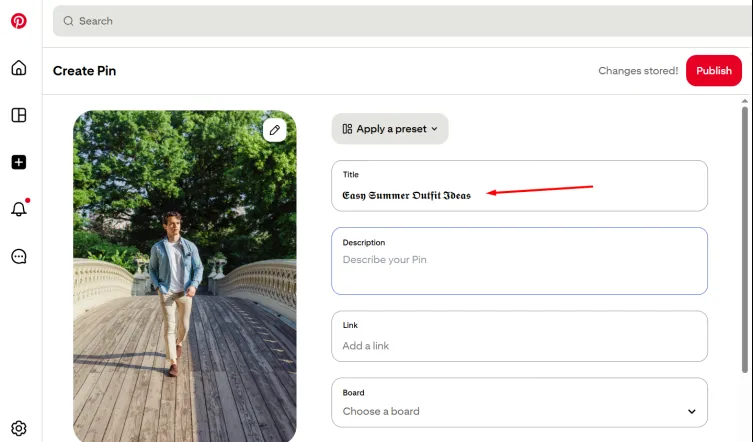
Before publishing your Pin, check how the text looks and make sure it is easy to read.
Best Practices for Adding Stylish Text to Pinterest Pin Titles
Fancy Unicode fonts can give your Pinterest Pin titles a different look without requiring you to install a font or edit the text in a design tool. You can use bold letters, cursive text, decorative characters, and other styles to make your titles stand out. Follow these practices to use them effectively.
1. Choose a Fancy Font That Suits Your Content
Different Unicode text styles create different effects. Bold letters can make a title look strong, while cursive letters can give it an elegant appearance. Choose a style that matches the subject of your Pin.
For example, you could use 𝐄𝐚𝐬𝐲 𝐑𝐞𝐜𝐢𝐩𝐞𝐬 for a cooking Pin or 𝓦𝓮𝓭𝓭𝓲𝓷𝓰 𝓘𝓭𝓮𝓪𝓼 for wedding inspiration. Try different styles with your title and choose one that looks good while remaining easy to read.
2. Try Different Unicode Font Variations
You do not have to stick to bold or cursive text. You can use different Unicode styles, including double-struck, monospace, italic, and decorative letters. Each style gives your Pin title a different appearance. For example, "Travel Tips" can look like 𝐓𝐫𝐚𝐯𝐞𝐥 𝐓𝐢𝐩𝐬 in bold, 𝑇𝑟𝑎𝑣𝑒𝑙 𝑇𝑖𝑝𝑠 in italic, or 𝕋𝕣𝕒𝕧𝕖𝕝 𝕋𝕚𝕡𝕤 in double-struck text.
Try different variations to find a style that matches your Pin's design and keeps the title easy to read.
3. Apply Fancy Text to Important Words
You can convert only the most important words in your title instead of styling the entire phrase. This makes the key terms stand out while keeping the rest of the title simple.
For example, you could write "10 𝐄𝐚𝐬𝐲 Ideas for Small Bedrooms," using bold Unicode letters for "Easy" and ordinary text for the remaining words. You can also style words such as "DIY," "Budget," or "Beginner" to emphasize what readers can expect from your Pin.
4. Combine Fancy Text With Decorative Symbols
Some Pinterest Pin titles look more distinctive when you combine fancy Unicode letters with a few decorative symbols. You can use stars, hearts, arrows, or similar characters to complement the text.
For example, a title about journaling could look like "✧ 𝓙𝓸𝓾𝓻𝓷𝓪𝓵 𝓘𝓭𝓮𝓪𝓼 ✧". A fashion Pin might use "♡ 𝐎𝐮𝐭𝐟𝐢𝐭 𝐈𝐝𝐞𝐚𝐬 ♡". Keep the symbols relevant to your content and avoid adding too many around the title.
5. Avoid Mixing Too Many Fancy Font Styles
Using several Unicode styles in one title can make it look inconsistent. Although you can combine different styles, limit yourself to one or two that work well together.
This keeps the text visually clear and prevents decorative letters from competing for attention. The same goes for writing YouTube titles and descriptions with fancy text.
You have to keep the text readable and use different styles carefully. If you want to learn more about it, you can read our guide on “How to Use Stylish Text in YouTube Titles and Descriptions.” It will help you choose suitable text styles and use them effectively in your YouTube content.
6. Make Sure Your Fancy Text Displays Correctly
Unicode fancy text uses special characters that resemble letters in different styles. These are not ordinary font changes, so their appearance and support can vary between platforms and devices. Some characters may look different from what you expect or may not display properly.
7. Keep Important Keywords Easy to Recognize
Fancy text can change the appearance of your title, but readers should still be able to identify its main topic. Use recognizable versions of your keywords and avoid adding unnecessary characters that interrupt the words.
Final Words
Stylish text gives your Pinterest Pin titles a creative look and helps you present your content in different ways. Experiment with bold, cursive, and other fancy Unicode styles to find what suits your Pins.
You can also use decorative symbols or highlight specific words to add variety. Keep your text readable and choose styles that match your content. With the right approach, you can create distinctive Pin titles that reflect your style and communicate your ideas clearly.