November 5, 2026
How to Write Bold, Italic, and Stylish Text on WhatsApp
Learn how to write bold, italic, and stylish text on WhatsApp using built-in formatting options and decorative Unicode fonts.
WhatsApp lets you format your messages in different ways to make certain words stand out. You can write bold text to highlight important information or use italics to give a word a different emphasis. It also supports decorative text styles that can make your messages look different from ordinary text.
These formatting options are easy to use once you know the right steps. In this article, I'll explain how to write bold, italic, and stylish text on WhatsApp and share a few tips for using them.
How to Write Bold Text on WhatsApp?
You can make text bold on WhatsApp by placing an asterisk (*) before and after the words you want to highlight. WhatsApp automatically applies bold formatting when you send the message.
Follow these steps:
Open WhatsApp and select the chat where you want to send a message.
Type an asterisk (*) before the text you want to make bold.
Add another asterisk at the end of the text.
The text will now appear in bold.
Send your message.
For example, if you type Hello there!, WhatsApp will display it as Hello there!
You can also apply bold formatting to individual words instead of an entire sentence. Just make sure you place the asterisks around the correct text.
How to Write Italic Text on WhatsApp?
WhatsApp also lets you italicize text using underscores (_). The process is similar to bold formatting, but you need to use underscores instead of asterisks.
Here is how to do it:
Open a WhatsApp conversation.
Type an underscore (_) before the text you want to italicize.
Add another underscore at the end, and the text will appear in italic format.
Send the message.
For example, typing See you soon will display the message as See you soon.
You can use this formatting to emphasize specific words, phrases, or complete sentences. It works in both individual and group chats.
How to Write Stylish Text on WhatsApp?
WhatsApp supports basic formatting options, but it does not offer a built-in way to create every decorative font style. So, to type stylish text, you can use WhatsApp Font Generator to convert ordinary text into different decorative styles.
It creates stylish text using Unicode characters, allowing you to copy and paste the results into your WhatsApp conversations.
You can use it by following these steps:
Open our WhatsApp Font Generator.
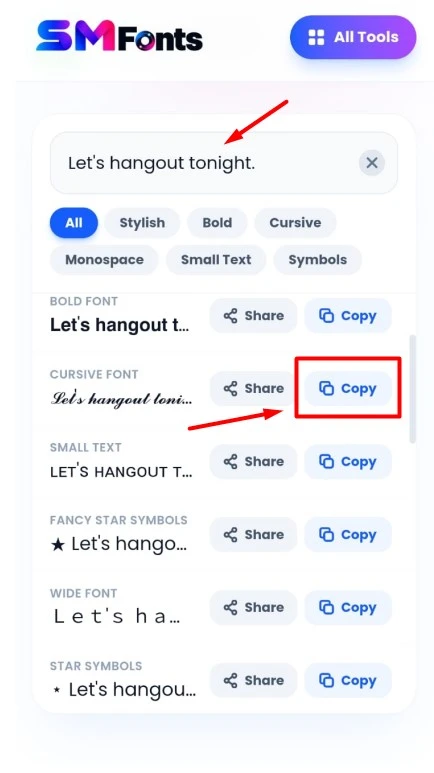
Enter the text you want to convert into the input box.
Browse the available font styles and choose the one you like.
Copy the converted text.
Open WhatsApp and select a conversation.
Paste the copied text into the message box and send it.
The tool provides different styles, including cursive, bold, small caps, and other decorative text designs. Since these styles use Unicode characters, they can appear differently from regular WhatsApp formatting.
You can use them in personal chats, group conversations, and even your WhatsApp profile information, depending on the character support of the relevant field.
Tips for Using Bold, Italic, and Stylish Text on WhatsApp
Here are a few tips to help you use different text styles without making your messages difficult to read:
Highlight important words: Use bold formatting for important details, reminders, or announcements.
Use italics for emphasis: Italic text works well when you want to give a particular word or phrase extra emphasis.
Avoid excessive formatting: Using too many styles in one message can make it difficult to read. Keep the formatting simple.
Check your symbols: Make sure you add the correct opening and closing symbols when using WhatsApp's built-in formatting.
Consider readability: Some decorative Unicode styles can be difficult to read, especially in longer messages.
Check compatibility: Fancy characters may not display correctly on every device or app version. If someone sees boxes or unusual symbols, try using regular text instead.
Final Words
WhatsApp offers simple ways to change the appearance of your messages using bold and italic formatting. You can apply these styles by adding the correct symbols around your text.
For more decorative options, Unicode-based styles provide additional choices. Use these formatting features where they make sense, and avoid adding too many styles to a single message.