October 15, 2026
How to Use Stylish Text in YouTube Titles and Descriptions
Learn how to use stylish text in YouTube titles and descriptions. Unicode font styles, step-by-step guide, examples, and best practices.
Is this conversation helpful so far?
YouTube video titles and descriptions usually appear in a standard font. But you may have noticed some creators using bold-looking letters, decorative text, or unusual symbols to highlight parts of their content.
You can create a similar effect using Unicode text styles. These characters can be copied into certain YouTube text fields without installing fonts or changing your device settings.
However, stylish text isn't always the best choice for a video title. Here's where it can be useful, how to add it, and what to consider before publishing.
Can You Use Different Fonts in YouTube Titles?
YouTube doesn't provide a built-in font selector for video titles. You can still paste supported Unicode characters that resemble bold, italic, cursive, or other text styles.
For example:
Regular text | Stylish text |
|---|---|
Travel Vlog | 𝗧𝗿𝗮𝘃𝗲𝗹 𝗩𝗹𝗼𝗴 |
Gaming Highlights | 𝙂𝙖𝙢𝙞𝙣𝙜 𝙃𝙞𝙜𝙝𝙡𝙞𝙜𝙝𝙩𝙨 |
New Video | 𝓝𝓮𝔀 𝓥𝓲𝓭𝓮𝓸 |
These aren't actual font changes within YouTube. They're different Unicode characters that resemble styled letters.
A short decorative phrase might work for a recognizable series or special announcement. For most searchable video titles, standard text is the safer choice because it's easier to read and interpret.
How to Add Stylish Text to a YouTube Video Title
You can create copy-and-paste text styles with the YouTube Font Generator.
Open the YouTube Font Generator.
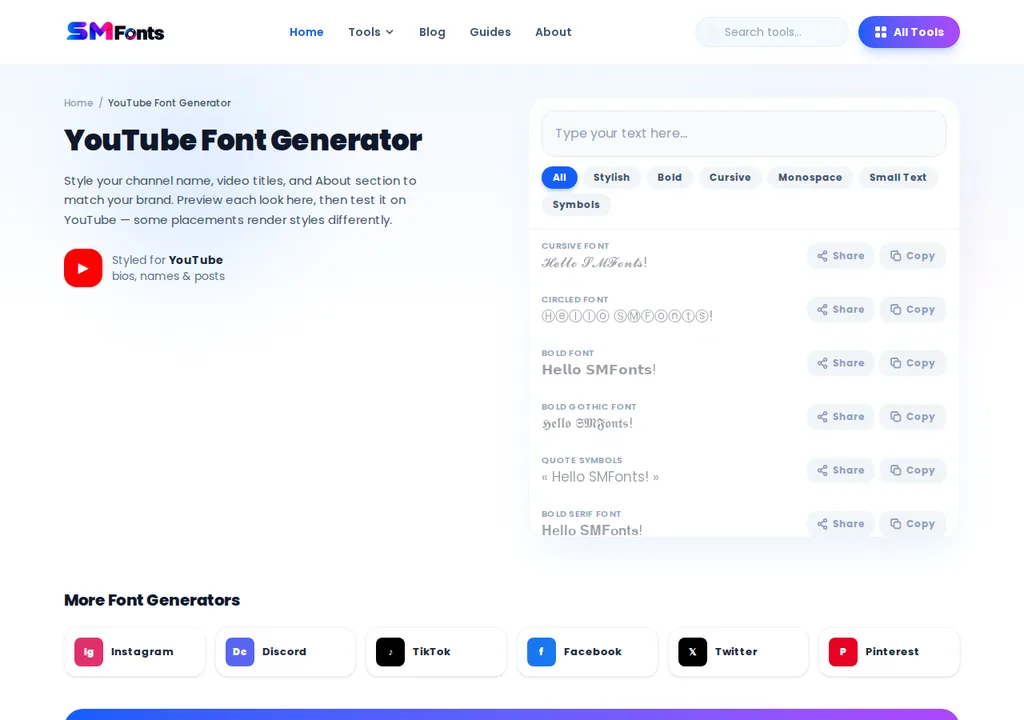
Type the short phrase you want to style.
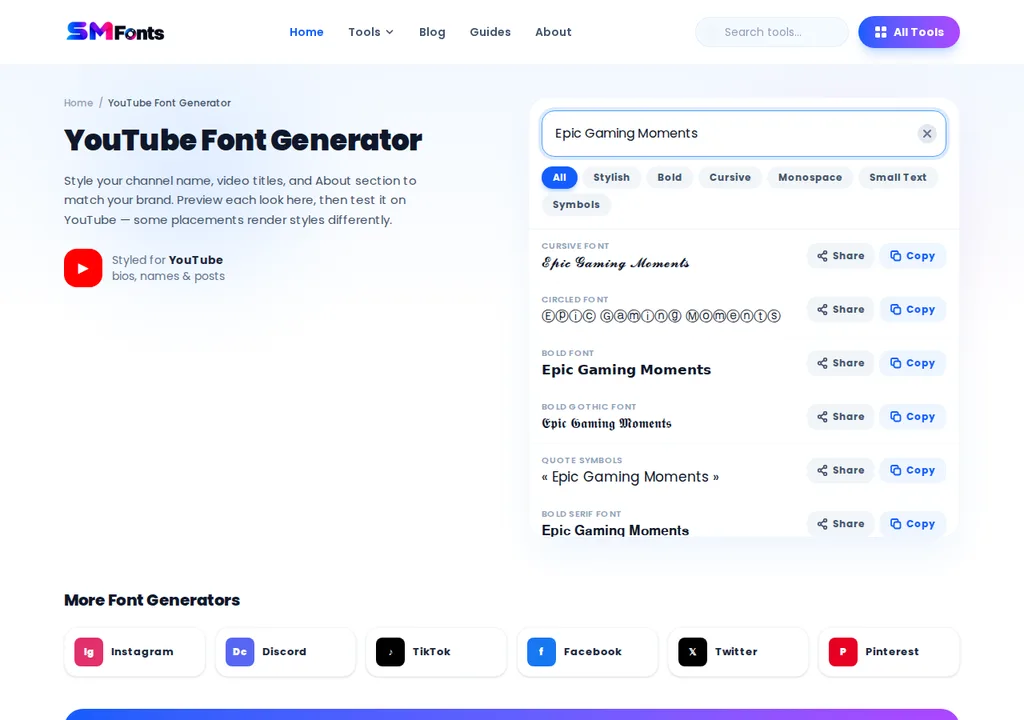
Browse the available text styles.
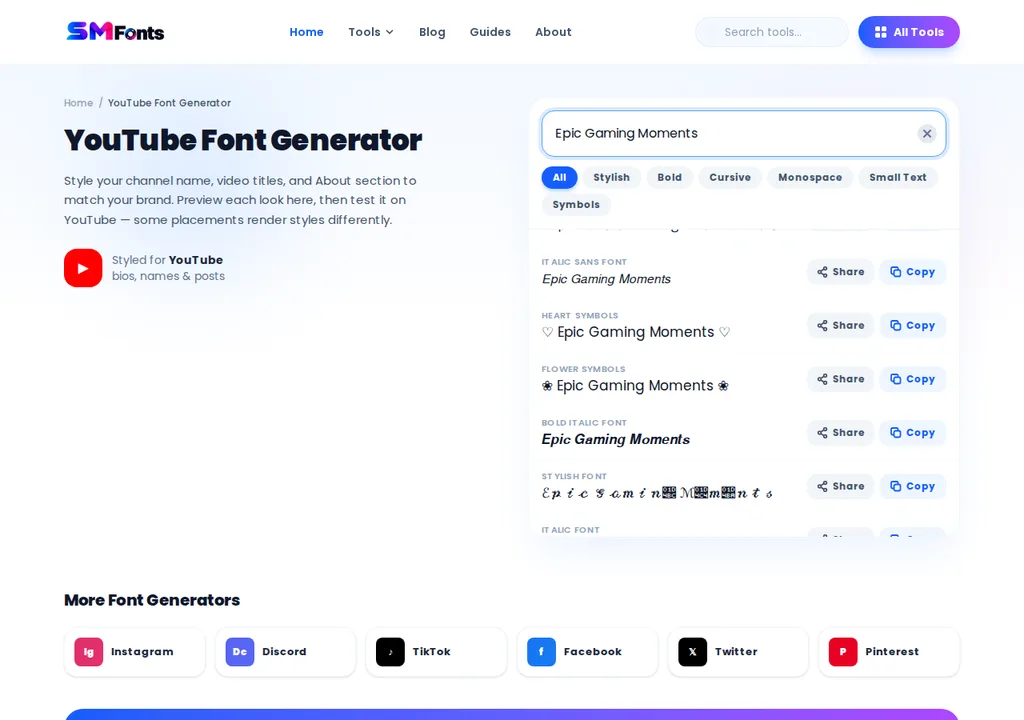
Copy a readable option.

Sign in to YouTube Studio and select Content.
Click the title or thumbnail of the video you want to edit.
Paste the styled phrase into the Title field.
Review the full title, then click Save.
For example, instead of styling an entire title, you could write:
Desk Setup Ideas for Small Rooms | 𝗕𝗲𝗳𝗼𝗿𝗲 & 𝗔𝗳𝘁𝗲𝗿
The main topic remains in regular text, while the final phrase gets additional visual emphasis.
Before saving, check that the title remains within YouTube's character limit and displays correctly on mobile.
How to Use Stylish Fonts in YouTube Descriptions
Descriptions give you more room to organize information than titles. That makes them a more practical place for occasional decorative headings.
You can use styled text to separate chapters, resources, or important notes.
For example:
ɪɴ ᴛʜɪs ᴠɪᴅᴇᴏ
I share five practical ways to organize a small workspace.
𝗨𝘀𝗲𝗳𝘂𝗹 𝗟𝗶𝗻𝗸𝘀
Find the products and resources mentioned in the video below.
『𝗧𝗶𝗺𝗲𝘀𝘁𝗮𝗺𝗽𝘀』
00:00 Introduction
01:15 Workspace layout
03:40 Cable management
The headings help visually separate sections without turning the entire description into decorative lettering.
To add these styles, generate the headings, copy them, and paste them into the video description in YouTube Studio.
Keep URLs, timestamps, product names, and important instructions in standard text.
Will Stylish Fonts Affect YouTube Search?
Stylish text doesn't automatically improve YouTube rankings or video recommendations.
A decorative Unicode character may look like an ordinary letter but have a different underlying character value.
For example, Video Tips and 𝗩𝗶𝗱𝗲𝗼 𝗧𝗶𝗽𝘀 aren't identical character sequences.
Search systems may normalize some Unicode variations, but you shouldn't assume every decorative style will be interpreted exactly like standard text.
For that reason, keep your main video topic and important search terms in ordinary letters.
YouTube's official video title and description guidance recommends using clear, accurate titles and helpful descriptions so viewers understand what they're watching.
A stylish phrase should never replace an informative title.
What Are the Limitations of Unicode Fonts on YouTube?
Copy-and-paste text styles are convenient, but they have a few limitations worth understanding.
Character compatibility: Some decorative characters may display differently across Android, iPhone, desktop browsers, and other devices.
Readability: Highly stylized letters can be difficult to recognize, especially in long titles or on smaller screens.
Accessibility: Screen readers may interpret certain decorative Unicode characters differently from regular letters.
Character limits: Some Unicode characters use multiple underlying code points, so styled text may reach field limits sooner than expected.
Search clarity: Decorative text can make keywords less straightforward for viewers to read, copy, or search.
These limitations don't mean you should avoid every styled character. They simply make selective use more practical.
When Should You Use Stylish Text on YouTube?
Styled Unicode text is most useful when it serves a specific purpose.
Situation | Recommended approach |
|---|---|
Search-focused video title | Use standard text for the main topic |
Special announcement | Consider styling a short phrase |
Description section headings | Use occasional readable decorative text |
Timestamps and chapters | Keep standard text |
Links and product information | Keep standard text |
Long descriptions | Prioritize regular text and clear spacing |
If your goal is to make a video more discoverable, focus first on an accurate title and useful description.
If your goal is to visually organize a description or emphasize a short phrase, a readable Unicode style may help.
The best approach is to make the content easy to understand before adding decoration.
Bringing it All Together
Stylish text can add visual emphasis to YouTube titles and descriptions without requiring special fonts or apps. You can use Unicode characters to highlight short phrases, create decorative headings, or organize description sections.
However, keep your main keywords, links, and timestamps in standard text for better readability. Choose styles that display correctly across devices, and prioritize clear, informative titles and descriptions over decorative lettering when helping viewers find your videos.