
October 16, 2026
How to Write Bold and Stylish Text on Facebook
Learn how to write bold and stylish text on Facebook posts, comments, and your profile. Step-by-step guide with font examples and tips.
Have you ever seen a Facebook post with bold headings or fancy-looking letters and wondered how to create the same effect?
Facebook doesn't offer a regular font picker for personal posts and comments, but you can still add bold, italic, cursive, and other decorative text styles.
The easiest method is to use Unicode characters that look like different fonts. You can copy them into Facebook without downloading a keyboard app or installing anything.
Here's how to format your text, where different styles work, and what to watch out for.
How to Make Text Bold in a Facebook Post
If you're writing a regular post on your personal profile, Facebook generally doesn't provide a bold formatting button for individual words. You can use copy-and-paste Unicode text instead.
Follow these steps:
Open the Facebook Font Generator.

Type the word, heading, or sentence you want to make bold.
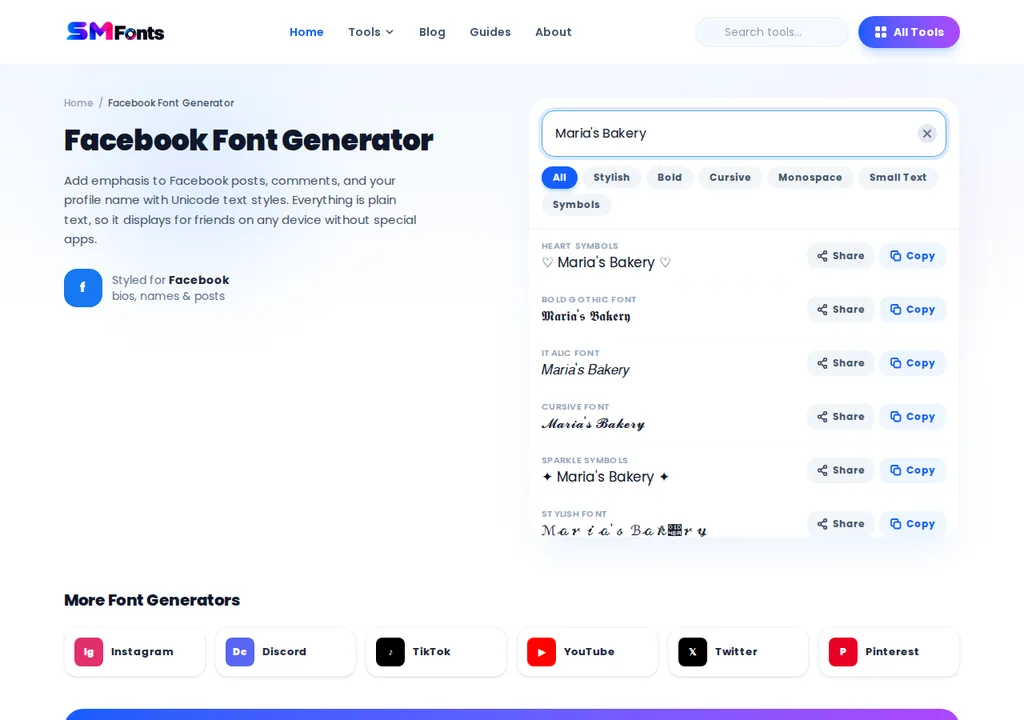
Find a bold Unicode text style in the generated results.
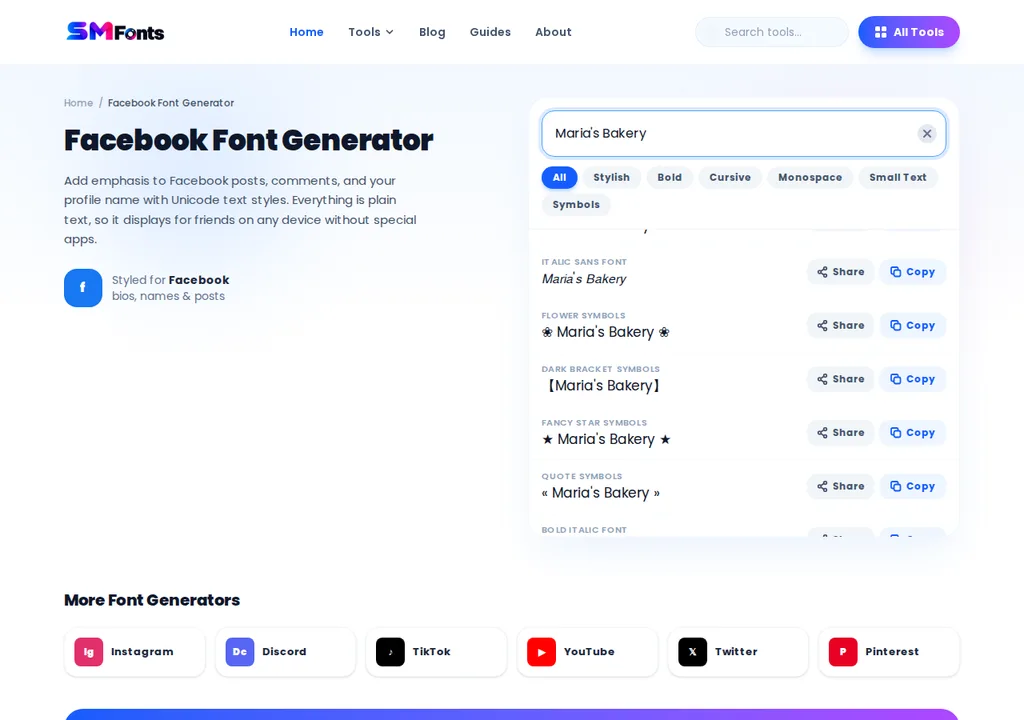
Copy the text.

Open Facebook and start writing a new post.
Paste the bold text where you want it to appear.
Review the post and select Post.
For example, a small business owner might write:
𝗪𝗲'𝗿𝗲 𝗛𝗶𝗿𝗶𝗻𝗴!
We're looking for a graphic designer to join our team.
Location: Austin, TX
Apply through the link in our profile.
Only the heading uses bold Unicode characters. The job details remain in regular text, making the post easier to scan.
How to Use Stylish Fonts in Facebook Comments
You can also paste decorative Unicode text into Facebook comments when the characters are supported.
The process is simple: generate your text, copy a style, and paste it into the comment field.
Here are a few examples:
Regular Text | Stylish Text |
|---|---|
Congratulations | 𝗖𝗼𝗻𝗴𝗿𝗮𝘁𝘂𝗹𝗮𝘁𝗶𝗼𝗻𝘀 |
Happy Birthday | 𝓗𝓪𝓹𝓹𝔂 𝓑𝓲𝓻𝓽𝓱𝓭𝓪𝔂 |
Great Work | 𝙂𝙧𝙚𝙖𝙩 𝙒𝙤𝙧𝙠 |
A short decorative phrase can work for birthday wishes, congratulations, or casual conversations.
For longer replies, standard text is usually easier to read. This is especially important when answering questions in Facebook Groups or sharing instructions.
Can You Use Different Fonts in Your Facebook Bio?
Facebook profiles include several fields for personal information, including an introduction or bio.
Some of these fields may accept Unicode text styles, depending on the characters and Facebook's current restrictions.
For example:
𝑫𝒊𝒈𝒊𝒕𝒂𝒍 𝑪𝒓𝒆𝒂𝒕𝒐𝒓
Photography | Travel | Everyday Life
You can create the decorative heading with the Facebook Font Generator and paste it into the relevant profile field.
Keep essential details, such as your business name, website, and contact information, in regular text so visitors can recognize and copy them easily.
Facebook's Built-In Formatting vs. Unicode Fonts
Facebook's text formatting options vary by post type. Regular personal posts and comments generally don't offer built-in bold or italic controls, while some Facebook Group post editors provide additional formatting options.
Unicode text works differently because its styled appearance comes from alternative characters rather than conventional text formatting.
Feature | Built-In Facebook Formatting | Unicode Text Styles |
|---|---|---|
How it works | Applies formatting through editor controls | Uses alternative Unicode characters |
Availability | Depends on the editor and post type | Works in text fields that accept the characters |
Bold text | Available in some Group post editors | Available through bold-style Unicode characters |
Cursive lettering | Not generally available as a standard formatting option | Available through decorative Unicode characters |
Best use | Structuring longer posts where supported | Adding short decorative headings or phrases |
When available, Facebook's built-in formatting is generally preferable for longer posts because it preserves ordinary text characters. For personal posts and comments without formatting controls, Unicode styles offer an alternative.
Why Does Bold Text Sometimes Look Different on Facebook?
A bold-looking Unicode letter isn't necessarily the same character as its regular equivalent.
For example:
Regular text: Facebook Update
Bold Unicode: 𝗙𝗮𝗰𝗲𝗯𝗼𝗼𝗸 𝗨𝗽𝗱𝗮𝘁𝗲
The second example uses mathematical-style Unicode characters. Facebook displays them using the fonts supported by the viewer's device.
This explains why a decorative style might look slightly different on an iPhone, Android phone, or desktop browser.
You may also encounter these problems:
Missing characters: Some symbols appear as boxes when a device doesn't support them.
Unexpected spacing: Decorative characters can change how words wrap across lines.
Copying difficulties: Certain styled characters may not behave like ordinary letters when someone searches for or copies the text.
Accessibility issues: Screen readers may announce decorative Unicode characters differently, making longer passages harder to understand.
If a style causes problems, replace it with regular text or a simpler Unicode alphabet.
Does Bold Text Improve Facebook Post Engagement?
Bold text can make a heading more noticeable, but it doesn't guarantee more likes, comments, shares, or reach.
Facebook's content distribution depends on multiple factors, including how people interact with posts. Decorative lettering alone isn't a proven ranking advantage.
For business pages, clarity is usually more useful than converting an entire promotional message into fancy characters.
Compare these examples:
Too much styling:
𝗖𝗛𝗘𝗖𝗞 𝗢𝗨𝗧 𝗢𝗨𝗥 𝗡𝗘𝗪 𝗦𝗘𝗥𝗩𝗜𝗖𝗘𝗦 𝗔𝗡𝗗 𝗦𝗣𝗘𝗖𝗜𝗔𝗟 𝗢𝗙𝗙𝗘𝗥𝗦!
More readable:
𝗡𝗲𝘄 𝗦𝗲𝗿𝘃𝗶𝗰𝗲𝘀 𝗔𝘃𝗮𝗶𝗹𝗮𝗯𝗹𝗲
We've added website maintenance and design support for small businesses. Message us for details.
The second version uses a short heading while keeping the main information straightforward.
When Should You Avoid Fancy Fonts on Facebook?
Decorative text isn't suitable for every situation.
Avoid using it for important announcements that must be accessible to everyone, detailed instructions, contact information, or text people need to search accurately.
For example, a Facebook Group administrator posting community rules should prioritize standard text and any available native formatting controls.
The same applies to businesses sharing addresses, prices, or customer support instructions.
For information about accessibility and supported features, visit the official Facebook Accessibility Help Center.
A practical rule is to use decorative lettering for occasional emphasis while keeping the message itself easy to read.
You can make a Facebook post more visually organized with a short bold heading, clear spacing, and a useful message. You don't need to change every word to make it noticeable.
To Sum It Up
Adding bold and stylish text to Facebook posts, comments, and profile details is a simple way to personalize your content. You can copy and paste Unicode characters to create decorative headings without installing extra apps.
Use these styles for short phrases rather than entire messages, and keep important details in regular text. This helps maintain readability, makes information easier to understand, and gives your Facebook content a distinct appearance.