
October 15, 2026
How to Use Different Fonts in TikTok Bios and Captions
Learn how to use different fonts in TikTok bios and captions with stylish Unicode text. Step-by-step guide, font examples, and pro tips.
Want to make your TikTok bio more personal or highlight something important in a video caption? You can use bold, cursive, and other stylish text without installing a special keyboard or app.
TikTok doesn't offer a traditional font picker for profile bios and post captions. However, you can copy and paste Unicode characters that look like different font styles.
Here's how to use them, which styles work best, and what to check before publishing.
Adding Different Fonts in Your TikTok Bio
Your TikTok bio tells visitors who you are and what kind of content you share. Whether you're a content creator, gamer, or small business owner, a readable text style can help highlight your name or a short description.
Follow these steps:
Open the TikTok Font Generator.
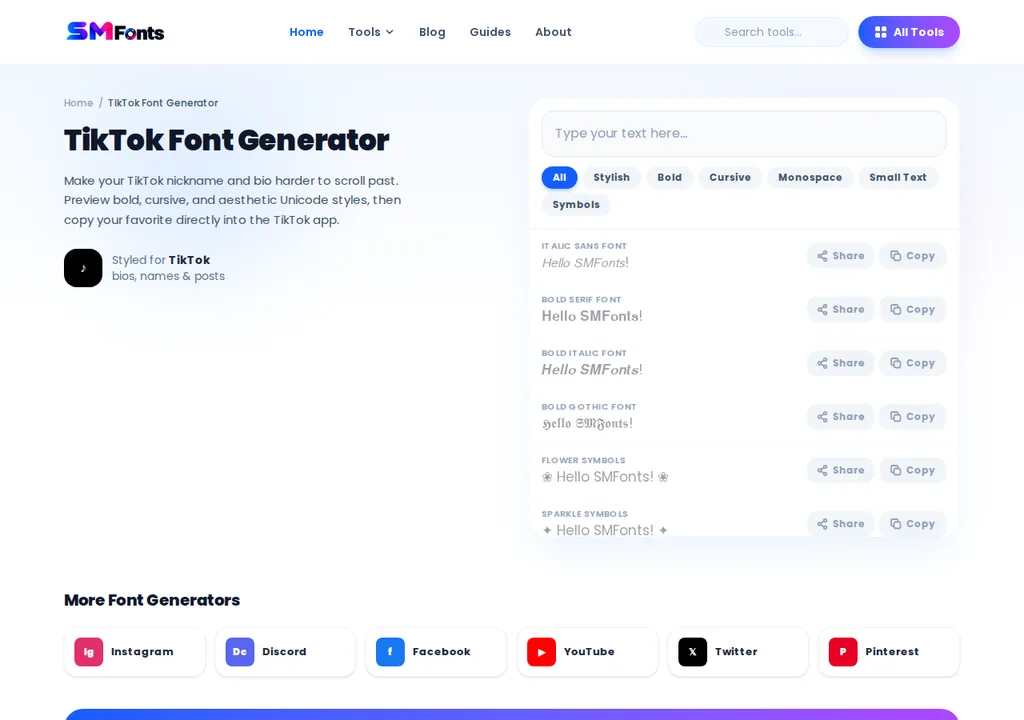
Enter your name, tagline, or the text you want to customize.
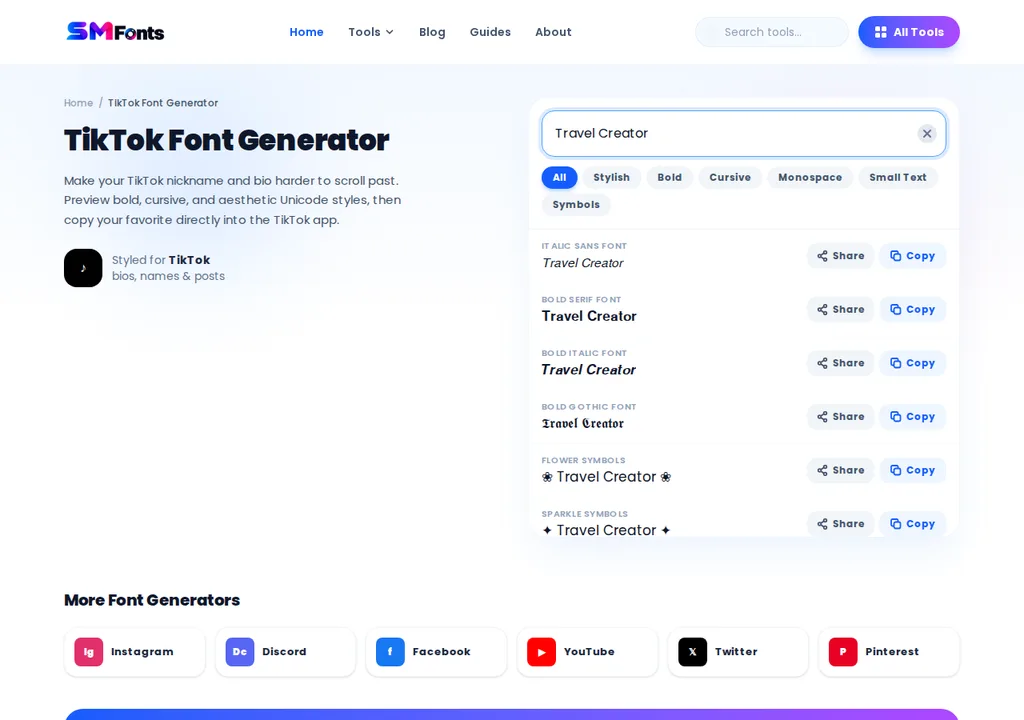
Browse the available styles, including bold, cursive, and decorative lettering.
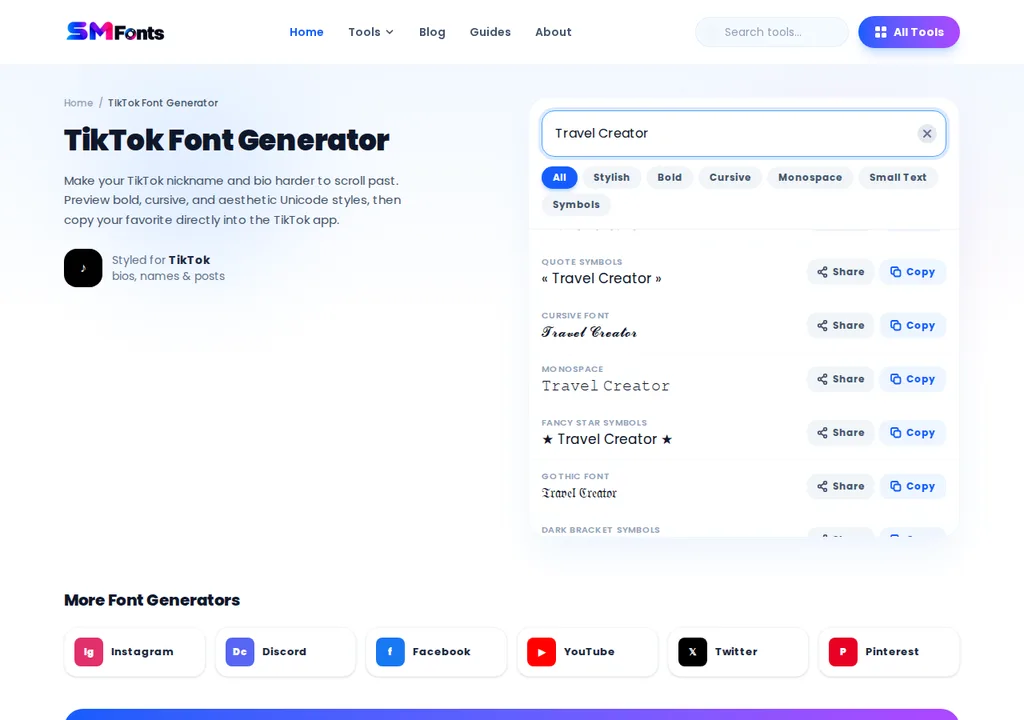
Copy your preferred text style.

Open TikTok and go to your profile.
Tap the edit icon.
Paste the styled text in the bio section and save your changes.
For example, a travel creator could use:
𝗧𝗿𝗮𝘃𝗲𝗹 𝗖𝗿𝗲𝗮𝘁𝗼𝗿 ✈️
Exploring new places & local food
Travel tips | Weekend adventures
The first line catches attention, while the remaining information stays easy to read.
You don't need to style every word. A short heading or name is often enough.
How to Add Stylish Fonts to TikTok Captions
TikTok captions help viewers understand what a video is about. They can provide context, introduce a topic, or encourage people to respond.
Unlike a profile bio, a caption belongs to an individual video. That makes readability particularly important.
Here's how to add a different font style:
Write your caption in regular text.
Choose a short phrase or heading you want to highlight.
Enter that phrase into the TikTok Font Generator.
Copy a readable text style.
Return to TikTok's video posting screen.
Paste the styled phrase into your caption.
Review the caption before publishing.
Example of a regular caption:
3 simple ways to organize your workspace. Which one would you try?
Example with a styled heading:
𝗪𝗼𝗿𝗸𝘀𝗽𝗮𝗰𝗲 𝗜𝗱𝗲𝗮𝘀 ✨
3 simple ways to organize your workspace. Which one would you try?
This approach highlights the topic without making the entire caption decorative.
Keep important keywords, hashtags, and descriptions in regular text whenever possible.
Which Font Styles Work Best on TikTok?
The right text style depends on where you're using it and what you want visitors to notice.
Font Style | Example | Best Use |
|---|---|---|
Bold | 𝗡𝗲𝘄 𝗩𝗶𝗱𝗲𝗼 | Caption headings and announcements |
Cursive | 𝓝𝓮𝔀 𝓥𝓲𝓭𝓮𝓸 | Personal and lifestyle bios |
Italic | 𝘕𝘦𝘸 𝘝𝘪𝘥𝘦𝘰 | Short phrases |
Monospace | 𝙽𝚎𝚠 𝚅𝚒𝚍𝚎𝚘 | Gaming and tech profiles |
Double-struck | ℕ𝕖𝕨 𝕍𝕚𝕕𝕖𝕠 | Decorative profile headings |
These aren't traditional downloadable fonts. They are Unicode characters that resemble different lettering styles.
For example, the regular letter A and the mathematical bold character 𝗔 are different Unicode characters. A font generator uses these alternatives to create text you can copy and paste.
Because character support varies, the same style may look slightly different on an iPhone, Android device, or desktop browser.
TikTok Bio Fonts vs. Video Text Fonts
One common point of confusion is the difference between fonts used in TikTok bios and the text added directly to videos.
They work differently.
Feature | Bio and Caption Fonts | On-Screen Video Text |
|---|---|---|
How to customize | Copy and paste Unicode characters | Use TikTok's built-in editor |
Font options | Character-based styles | Built-in text styles |
Text colors | No custom color control through Unicode | Color options available |
Positioning | Controlled by TikTok's interface | Adjustable within the video |
Best for | Bios and caption highlights | Video hooks, subtitles, and labels |
If you're creating a video tutorial, product demonstration, or short story, TikTok's built-in text editor is usually the better option for text that appears on screen.
It gives you more control over how the text looks and where it appears.
You can explore TikTok's officialediting and posting guidance for information about its native video editing features.
Why Do Some TikTok Fonts Not Work?
You might copy a stylish font successfully but notice that it looks different or doesn't save when pasted into TikTok.
Here are the most common reasons.
Unsupported Unicode Characters
Not every device supports every Unicode character. Some decorative letters may appear as empty boxes or missing symbols.
Try a simpler style if this happens.
Bio Character Limits
TikTok restricts the length of profile bios. If your text doesn't save, check its length and remove unnecessary symbols or characters.
Some styled Unicode characters may also be counted differently from ordinary letters.
Different Display on iPhone and Android
The appearance of Unicode text depends on the fonts and rendering support available on each device.
A style that looks good on your phone may display differently for another user.
Too Many Decorative Characters
Combining several fancy alphabets, emojis, and symbols can make a bio or caption difficult to understand.
Use decorative text selectively and keep the main message readable.
Can You Use Fancy Fonts in TikTok Usernames?
TikTok has separate fields for your username, display name, and bio.
Your username is your unique account handle, such as @dailycreator. TikTok limits which characters can appear in usernames, so decorative Unicode letters generally aren't supported there.
Your display name, also called your nickname, is the name shown on your profile. It has different rules, although not every Unicode style will necessarily be accepted.
Your bio offers another place to add personality through short phrases and decorative lettering.
If you already have a recognizable username, there's usually no reason to change it just to experiment with fonts.
Do Fancy Fonts Affect TikTok Search or Accessibility?
Stylish text can make a phrase visually different, but it doesn't automatically improve discoverability.
Unicode decorative letters are not always treated the same way as ordinary text by search systems, screen readers, or other software.
For example:
Regular text: Travel Tips
Decorative text: 𝓣𝓻𝓪𝓿𝓮𝓵 𝓣𝓲𝓹𝓼
These may look similar, but they contain different characters.
For that reason, keep essential keywords, brand names, hashtags, and contact information in regular text.
Decorative lettering works better for short visual accents than for important information people need to search, read, or copy accurately.
TikTok'sofficial explanation of its recommendation system describes factors involved in recommending videos. Using fancy fonts isn't a guaranteed way to increase views or engagement.
Tips for Using TikTok Fonts Effectively
Before updating your bio or posting a caption, keep these points in mind:
Choose one readable decorative style instead of mixing several.
Highlight short phrases rather than entire paragraphs.
Keep hashtags and important search terms in regular text.
Check how your styled text looks after pasting it into TikTok.
Avoid unusual symbols in essential contact details.
Use TikTok's built-in text tools for lettering that appears directly on videos.
A good TikTok bio should quickly tell visitors what your account offers. A useful caption should help people understand the video.
Different fonts can support those goals, but the message itself should remain clear.
Finalizing
Using different fonts in TikTok bios and captions is a simple way to personalize your profile and highlight key phrases. You can copy and paste bold, cursive, or decorative Unicode text without installing additional apps.
Choose styles that match your content, keep important keywords readable, and check how the characters appear after pasting them into TikTok. Use decorative lettering sparingly to maintain clarity and make your profile easier to understand.